
WordPress plugin
A Black Friday mode
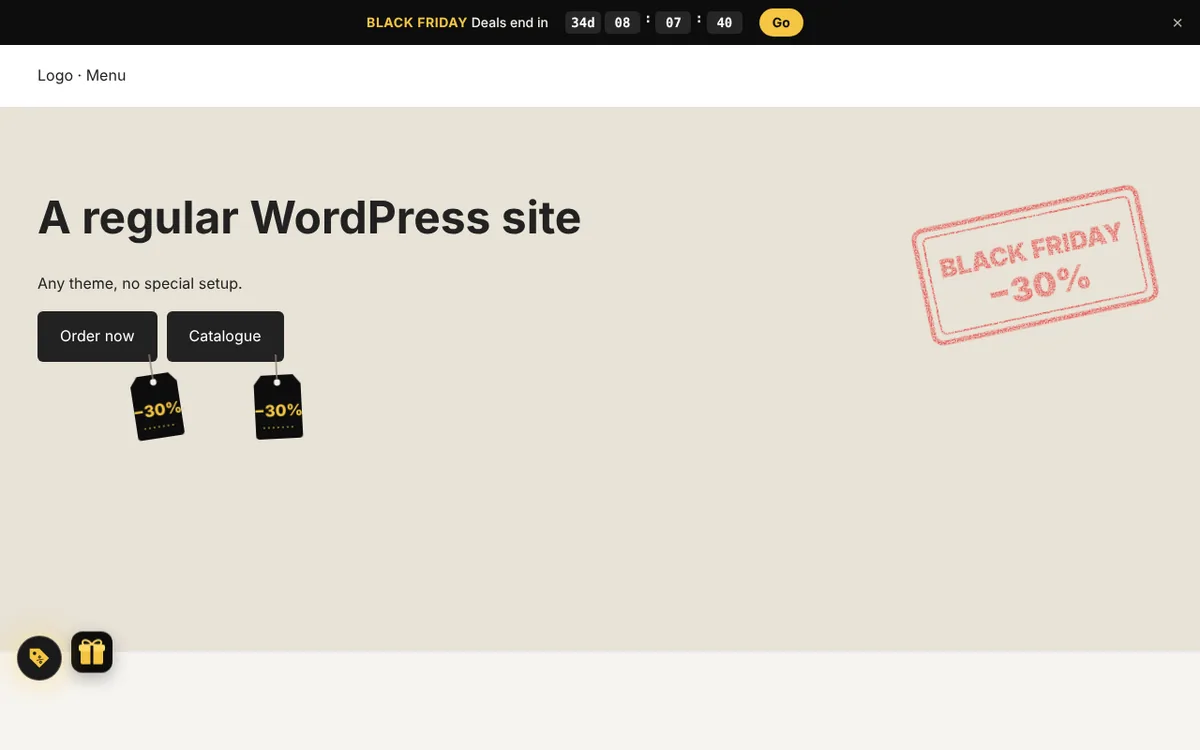
Everything for sale week in one plugin: a countdown bar to the end of the sale, discount tags on the main buttons, a gift with a scratch card hiding a promo code, a “Black Friday” stamp on the first screen and confetti on clicks. The plugin calculates the dates itself: the fourth Friday of November and Cyber Monday.
Try it right here
The plugin works on this page exactly as it does on a real site.
- Click the button below or the price tag in the bottom left corner.
- A countdown appears at the top and price tags on the buttons.
- Open the gift and scratch off the layer: the promo code is underneath.
What it does
A countdown bar
Days, hours, minutes and seconds to the end of the sale, with a button to the sale page.
Price tags on buttons
Black tags with the discount swing on the main buttons of the site.
A scratch card
A gift next to the button opens a card: scratch off the layer, see the promo code and copy it.
A sale stamp
A red “Black Friday” stamp with your discount on the first screen.
Confetti
Black and gold confetti from clicks on buttons and links.
Analytics events
A click in the bar, opening the gift, scratching the layer, copying the promo code.
Settings
Its own page in the WordPress admin, no code.
- Mode
- off · button in season · on in season · button all year
- Season
- 7 days before Black Friday until Cyber Monday, adjustable
- Countdown
- to the end of the season or to your date and time
- Sale
- discount label, bar text, promo code, link
- Effects
- each one turns on separately
Under the hood
Vanilla JavaScript with no libraries or dependencies.
- Themes
- any: the bar goes above the header, tags find the buttons themselves
- Page caching
- the season and the countdown are calculated in the browser
- Accessibility
- the scratch card opens with Enter; no animation with reduced motion
- Languages
- Ukrainian and English; texts via Polylang or WPML
Questions
Countdown to the end of the day or to an exact time?
By default to the end of Cyber Monday, but you can set your own end date and time.
What if there is no promo code?
Then the discount label, e.g. “−30%”, is under the layer, and the button leads to the sale page.
Can the bar be closed?
Yes, with the cross, and it won’t come back until the end of the visitor’s session.
Want this plugin on your site?
I’ll install it, match it to your theme and brand, or build a seasonal mode for your holiday.
Other plugins