
WordPress plugin
Site X-Ray: an SEO audit in one click
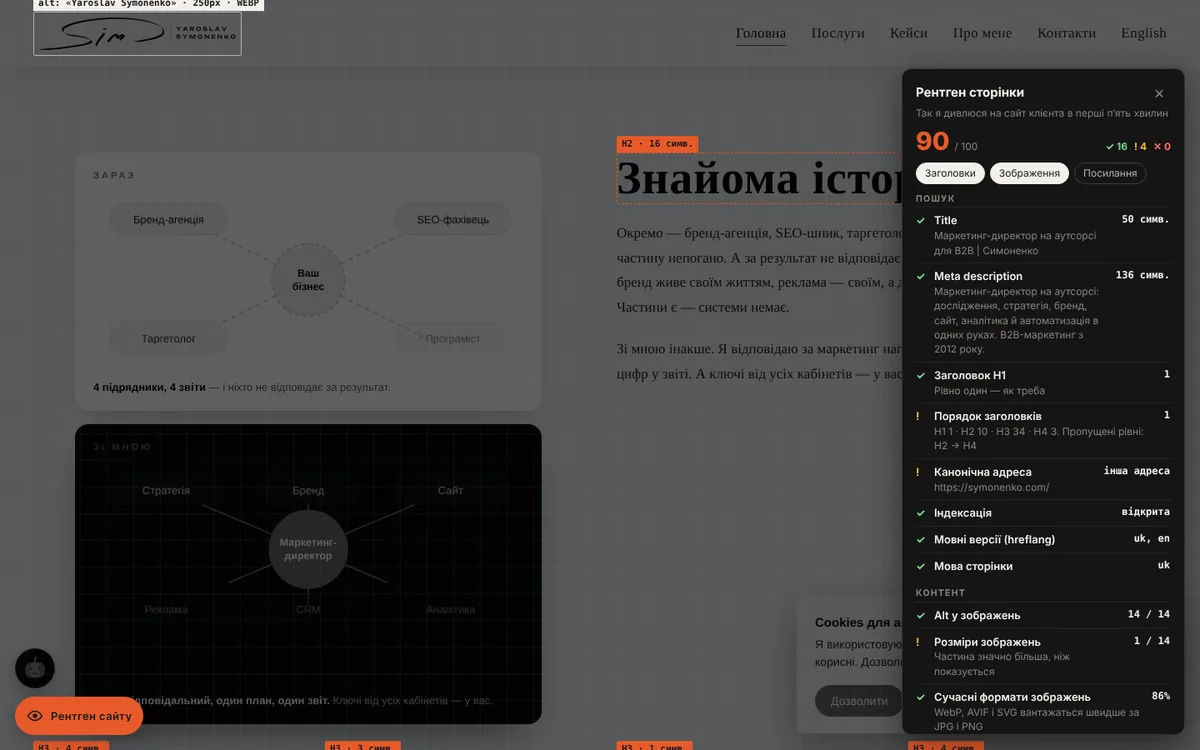
A button in the corner of the site turns on an “X-ray”: the page goes dark, headings, images and links get outlined, and a panel shows an SEO and speed report. For an owner it is a quick audit without third-party services; for an agency it is a feature that shows how you look at websites.
Try it right here
The plugin works on this page exactly as it does on a real site.
- Click the button below or the “eye” in the bottom left corner.
- Look at the outlines: headings, images, links.
- Open the report on the right and copy it in one click.
What it does
Outlines right on the page
H1–H6 with length and skipped levels, images with alt, format, weight and real width, links without text for screen readers.
20 checks in the report
Title, description, H1, heading order, canonical, noindex, hreflang, alt, WebP/AVIF formats, TTFB, LCP, CLS, page weight, Open Graph, Schema.
Doesn’t slow the site
While the X-ray is closed, only the button is on the page. Styles load after the page, measurements only when it opens.
Two modes
Admins only, as a private audit tool. Everyone, as a showcase feature for an agency or SEO specialist.
Multilingual
The interface is in Ukrainian and English; texts and the call to action are translated in Polylang or WPML.
Privacy
Everything is calculated in the browser. The plugin stores nothing on the server and sends nothing anywhere.
Settings
Its own page in the WordPress admin, no code.
- Who sees the button
- off · editors and admins only · all visitors
- Position
- left or right, offsets from the side and bottom
- Colour
- an accent to match the brand
- Default layers
- headings, images, links
- Texts
- button label, subtitle, a call to action under the report linking to a page
- Scope
- a CSS selector, e.g. main
- Quick access
- an “X-ray” item in the admin bar and ?xray=open in the address
Under the hood
Vanilla JavaScript with no libraries or dependencies.
- Compatibility
- any theme, page caching, Polylang and WPML
- Accessibility
- keyboard, Esc closes, reduced motion turns animation off
- Measurements
- LCP and CLS via PerformanceObserver, page weight from Resource Timing
Questions
Will visitors see the button?
Only if you choose the “everyone” mode. By default only editors and admins see it.
Does the report match PageSpeed Insights?
No: the X-ray measures your own visit in your own browser. It is a quick “here and now” check, not Google’s lab test.
Can I check any page?
Yes, the button works on every page of the site. Add ?xray=open to the address to open the X-ray right away.
Want this plugin on your site?
I’ll install it, match it to your theme and brand, or build a seasonal mode for your holiday.
Other plugins